


|
||||||
| DIY (Do-It-Yourself) Guides For all DIYs. |
 |
|
|
Thread Tools | Search this Thread |
 06-09-2013, 12:17 PM
|
#15 |
|
JDM Vaping Stance Nation

Join Date: May 2013
Drives: 2013 White
Location: FL
Posts: 710
Thanks: 652
Thanked 345 Times in 218 Posts
Mentioned: 14 Post(s)
|
Got mine installed finally using this guide and another picture.
Part that had me stumped was this: 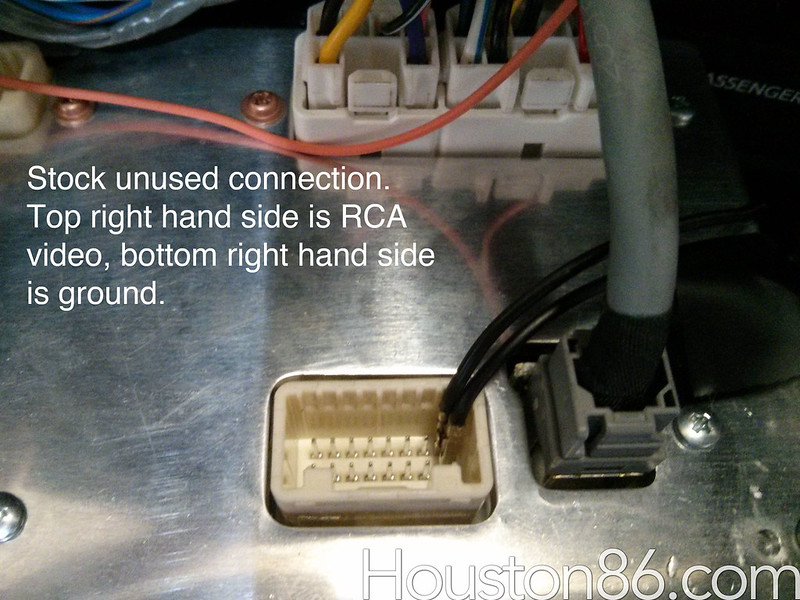 If you are looking at the HU the same direction as this picture (with the grey USB connector on the right there) then the Bottom one is the Video, the Top one is the ground. |

|

|
|
06-09-2013, 04:43 PM
|
#16 |
|
Senior Member
Join Date: Jul 2012
Drives: 2013 Asphalt FR-S Manual
Location: Whitby, ON, Canada
Posts: 6,716
Thanks: 7,875
Thanked 3,353 Times in 2,134 Posts
Mentioned: 99 Post(s)
|
Anyone know if this works on the upgraded Canadian HU as well, or just the US market one?
__________________
Light travels faster than sound, so people may appear to be bright until you hear them speak... flickr |
|
|
|
|
06-09-2013, 08:01 PM
|
#17 | |
|
Professional Smartass
Join Date: Jul 2012
Drives: White Out FRS
Location: Houston TX
Posts: 1,126
Thanks: 114
Thanked 611 Times in 309 Posts
Mentioned: 51 Post(s)
|
Quote:
|
|
|
|
|
|
06-10-2013, 09:48 AM
|
#18 |
|
Senior Member
Join Date: Jul 2012
Drives: 2013 Asphalt FR-S Manual
Location: Whitby, ON, Canada
Posts: 6,716
Thanks: 7,875
Thanked 3,353 Times in 2,134 Posts
Mentioned: 99 Post(s)
|
I'm curious if our HU even has video input or the ability to display the video. I know it can't play movie files, even when stationary.
__________________
Light travels faster than sound, so people may appear to be bright until you hear them speak... flickr |
|
|
|
|
06-17-2013, 10:20 PM
|
#19 | |
|
Diesel Tech
Join Date: Dec 2012
Drives: 2013 FR-S Hot Lava 6MT
Location: London
Posts: 109
Thanks: 54
Thanked 31 Times in 15 Posts
Mentioned: 3 Post(s)
|
Quote:
On another note, has anyone found a proper terminal for the signal wire in the plug? Or know where to start to look? |
|
|
|
|
|
06-18-2013, 01:42 AM
|
#20 |
|
Senior Member
Join Date: Jul 2012
Drives: FRS
Location: Cali
Posts: 1,558
Thanks: 188
Thanked 462 Times in 264 Posts
Mentioned: 9 Post(s)
|
Does the cam turn on automatically when you put the car into reverse? Or do you have to select it on the bespoke when you back up?
|
|
|
|
|
06-18-2013, 09:17 AM
|
#21 | |
|
Professional Smartass
Join Date: Jul 2012
Drives: White Out FRS
Location: Houston TX
Posts: 1,126
Thanks: 114
Thanked 611 Times in 309 Posts
Mentioned: 51 Post(s)
|
Quote:
|
|
|
|
|
|
06-18-2013, 09:48 AM
|
#22 |
|
Diesel Tech
Join Date: Dec 2012
Drives: 2013 FR-S Hot Lava 6MT
Location: London
Posts: 109
Thanks: 54
Thanked 31 Times in 15 Posts
Mentioned: 3 Post(s)
|
You can make it come on when the reverse gets power, or put it on a switch if you don't want it to come on every time.
|
|
|
|
|
06-18-2013, 11:20 AM
|
#23 | |
|
Senior Member
Join Date: Jul 2012
Drives: 2013 Asphalt FR-S Manual
Location: Whitby, ON, Canada
Posts: 6,716
Thanks: 7,875
Thanked 3,353 Times in 2,134 Posts
Mentioned: 99 Post(s)
|
Quote:
__________________
Light travels faster than sound, so people may appear to be bright until you hear them speak... flickr |
|
|
|
|
|
07-02-2013, 08:12 PM
|
#24 |
|
Addicted

Join Date: Jun 2012
Drives: 2013 Asphalt FR-S 6MT
Location: United States
Posts: 1,093
Thanks: 260
Thanked 261 Times in 175 Posts
Mentioned: 7 Post(s)
|
Interesting.
What gauge wire did you stick into the 28pin connector? So if I wanted to wire it into the driver side fuse box, would any 12V connection work using a tap-a-fuse?
__________________
Phantom Supercharger | Tsudo Cat-Back Exhaust | K&N Drop-in Filter | Winjet Headlights | Opti-coated | 35/20 Tint | Radar/Dashcam Hardwired | OFT tuned | OEM Audio+ Reference 400CF | Uber Sound Deadened | LED DRL strips | JPM Coachworks Kneepads
|
|
|
|
|
08-05-2013, 05:06 PM
|
#25 |
|
StatusLow

Join Date: Jul 2013
Drives: 2013 10 Series FRS
Location: Meridian, MS
Posts: 124
Thanks: 21
Thanked 35 Times in 25 Posts
Mentioned: 2 Post(s)
|
ok so I have tried this several times now, going back and forth trying to get it to work and no matter what I do it never shows the backup camera.
I am not the type of guy who uses DIY's but i needed it for the correct pinnout of the headunit. now my car is the 10 Series FRS but all the plugs look the same as the Bespoke. What am I missing? EDIT: Ok I just figured it out, Thanks to a post on another thread, I realized the camera had to be powered within 3 seconds of the head unit powering on. Since I was just testing the wires and nothing is hard wired yet, my camera wasnt powered until later with my power probe. but after giving it power while cutting it on, everything works. Last edited by Dustin2JZ; 08-05-2013 at 05:53 PM. |
|
|
|
|
08-05-2013, 09:10 PM
|
#26 | |
|
Junior Member

Join Date: May 2013
Drives: 2013 Scion FR-S
Location: Florida
Posts: 5
Thanks: 0
Thanked 1 Time in 1 Post
Mentioned: 1 Post(s)
|
Quote:
|
|
|
|
|
|
08-05-2013, 09:48 PM
|
#27 |
|
Senior Member
Join Date: Mar 2012
Drives: 2016 STI DGM
Location: Chattanooga, TN
Posts: 1,875
Thanks: 1,189
Thanked 1,460 Times in 662 Posts
Mentioned: 9 Post(s)
|
I'd love to see someone find a way to mount one in the spoiler like a G37. It should have a great angle for it (at least on the BRZ).

__________________
 Subaru STI : Subaru STI : |
|
|
|
|
08-05-2013, 09:58 PM
|
#28 | |
|
Senior Member
Join Date: Jul 2013
Drives: 2013 10 series FRS #944
Location: Seattle, WA
Posts: 1,705
Thanks: 329
Thanked 352 Times in 248 Posts
Mentioned: 6 Post(s)
|
Quote:
|
|
|
|
|
|
|
|
|
|
|
 Similar Threads
|
||||
| Thread | Thread Starter | Forum | Replies | Last Post |
| Scion FRS Bespoke Backup Camera, What do I need? | post_break | Electronics | Audio | NAV | Infotainment | 8 | 07-02-2016 09:55 PM |
| Kenwood CMOS-210 Backup Camera Install | TSY | Electronics | Audio | NAV | Infotainment | 34 | 12-10-2014 01:18 PM |
| Running Backup Camera Wire | Tony Mac | Electronics | Audio | NAV | Infotainment | 9 | 12-04-2013 11:28 PM |
| Beat-Sonic Backup Camera & Adapter for FR-S (Bespoke) & BRZ Special Price | Beat-Sonic | Audio/Visual, Electronics, Infotainment, NAV | 60 | 07-15-2013 03:58 PM |
| Backup Camera Help | husker741 | Electronics | Audio | NAV | Infotainment | 2 | 02-13-2013 01:04 AM |


