


 03-13-2014, 08:23 PM
|
#393 |
|
Banned
Join Date: Oct 2013
Drives: 2013 FR-S
Location: Shelby, NC
Posts: 626
Thanks: 209
Thanked 409 Times in 144 Posts
Mentioned: 15 Post(s)
|
i have 0 fucks idea what is going on in this thread
|

|

|
|
03-13-2014, 08:26 PM
|
#394 | |
|
blowhard
Join Date: Jun 2013
Drives: frs, project forester
Location: ma
Posts: 980
Thanks: 53
Thanked 604 Times in 316 Posts
Mentioned: 5 Post(s)
|
Quote:
|
|
|
|
|
|
03-13-2014, 08:49 PM
|
#395 | |
|
Senior Member

Join Date: Mar 2013
Drives: FR-s
Location: CA
Posts: 242
Thanks: 90
Thanked 30 Times in 19 Posts
Mentioned: 0 Post(s)
|
Quote:
Sent from my C6606 using Tapatalk |
|
|
|
|
|
03-13-2014, 08:52 PM
|
#396 | |
|
blowhard
Join Date: Jun 2013
Drives: frs, project forester
Location: ma
Posts: 980
Thanks: 53
Thanked 604 Times in 316 Posts
Mentioned: 5 Post(s)
|
Quote:
There's a big difference between just driving screens with independent cards and linking cards via sli or crossfire |
|
|
|
|
|
03-13-2014, 08:53 PM
|
#397 | |
|
Senior Member
Join Date: Mar 2013
Drives: FR-s
Location: CA
Posts: 242
Thanks: 90
Thanked 30 Times in 19 Posts
Mentioned: 0 Post(s)
|
Quote:
Sent from my C6606 using Tapatalk |
|
|
|
|
|
03-13-2014, 08:56 PM
|
#398 |
|
Banned
Join Date: Jul 2012
Drives: 2002 BMW 530i, 10 Series FR-S
Location: Puerto Rico
Posts: 3,404
Thanks: 3,416
Thanked 3,334 Times in 1,754 Posts
Mentioned: 60 Post(s)
|
I believe you can run 2 different brand cards, as long as they are clocked the same.
back in the day I ran a 4870 and 4970 in Xfire, and all it did was run the 4970 at 4870 speeds. |
|
|
|
|
03-16-2014, 02:54 PM
|
#399 |
|
blowhard
Join Date: Jun 2013
Drives: frs, project forester
Location: ma
Posts: 980
Thanks: 53
Thanked 604 Times in 316 Posts
Mentioned: 5 Post(s)
|
Maxcoin finally dropped enough that I switched off it, the decreases in difficulty had kept it going well enough.
Reconfigured things to coinshift a few hours ago. 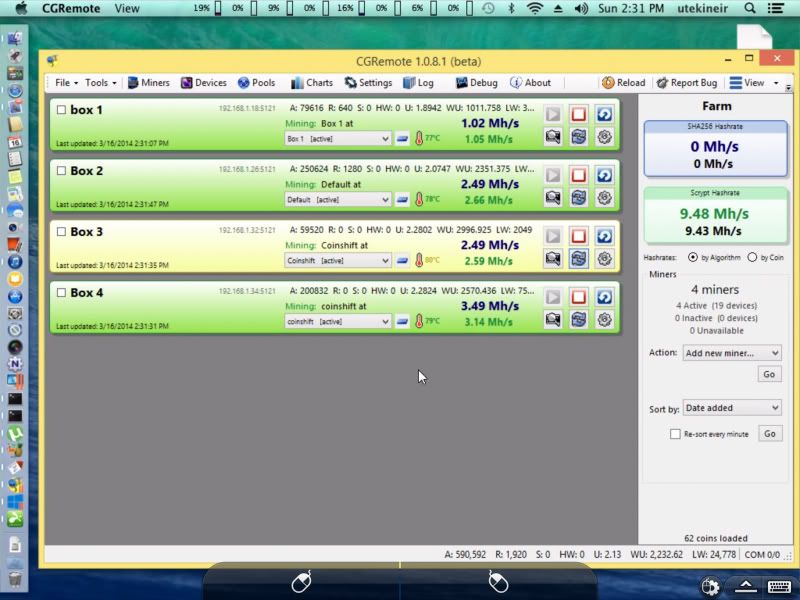 Also put on cgremote and started playing with xintensity, next on the list is new thermal paste for all cards, bios modding and tweaking of settings, should be able to squeeze a bit more out. Running it through parallels on home server Mac mini, then splashtop for remote access. edit: coinshift sucked once i switched over Last edited by utekineir; 03-18-2014 at 10:37 AM. |
|
|
|
|
03-18-2014, 10:35 AM
|
#400 |
|
Senior Member
Join Date: Nov 2011
Drives: Some rust bucket
Location: Polar ice cap
Posts: 3,058
Thanks: 312
Thanked 1,046 Times in 556 Posts
Mentioned: 37 Post(s)
|
Got my five 280x cards yesterday. Ran into a couple of issues.
1. Win7 will not properly see five GPUs. Four seems to be the limit. I didn't mess with any driver hacks. Ended up installing Win8 instead. All five cards were recognized. 2. With five cards, one card always end up being "sick". Ran four cards and it seemed to run just fine. Don't think it's the PSU as I have an 850w and a 1050W. The 850w has two cards connected and the 1050w has three cards. 3. Hash rate on these Asus 280x cards seems lower than usual. I'm ranging from 600-680 Khash per card. On my MSI 280x cards, I'm usually getting around 700 Khash. I'm running the same settings on both the Asus and MSI cards, I -13 etc. |
|
|
|
|
03-18-2014, 10:39 AM
|
#401 | |
|
blowhard
Join Date: Jun 2013
Drives: frs, project forester
Location: ma
Posts: 980
Thanks: 53
Thanked 604 Times in 316 Posts
Mentioned: 5 Post(s)
|
Quote:
What sort of adapters are you running to make up the power connections, the sick issue may be with that. If you're using molex adaptors make sure no wires backed out of the connectors. My issue with the 5 on that system was related to connectors and adaptors. I am using a mobo on that system that had an extra set of plugs to power the board though i'm not sure if any of that actually gets to the pciex slots. |
|
|
|
|
|
03-18-2014, 10:47 AM
|
#402 | |
|
Senior Member
Join Date: Nov 2011
Drives: Some rust bucket
Location: Polar ice cap
Posts: 3,058
Thanks: 312
Thanked 1,046 Times in 556 Posts
Mentioned: 37 Post(s)
|
Quote:
I'm running five PCI-E 1x to 16x adapers. Each adapter has a SATA powered connector. PSU1 (850w) is supplying one SATA "line" to power two cards. PSU2 (1050w) is supplying one SATA "line" to power three cards. Is it possible that the line for PSU2 can't provide enough power for three cards? Maybe I should run an additional "line" for the third GPU. "line" as in PSU cable with 3 SATA adapters. I'm also not using any molex to PCI-E adapters. All cards are connected with the factory PCI-E cables. This is all on the Asrock H81 BTC board. It has two additional molex adapters that's supposed to provide additional power to the PCI-E slots. I tried running with no powered risers and the cards weren't able to start up. I thought the two molex adapters on the board was supposed to be a substitute for powered risers. |
|
|
|
|
|
03-18-2014, 10:54 AM
|
#403 |
|
blowhard
Join Date: Jun 2013
Drives: frs, project forester
Location: ma
Posts: 980
Thanks: 53
Thanked 604 Times in 316 Posts
Mentioned: 5 Post(s)
|
My risers are unpowered, not at all ideal, but hasn't been an issue yet, just have been very careful not to be lacking on the pcie power side.
Afterburner has been very useful. It allows you to tweak powertune setting, fan, and gpu, memory speeds across all the cards on the fly. Mostly i've been using it to try keep the card temperatures in check with the changing ambient in the house since till then end of this cold the computers are providing free heat. Once it warms up i'll wire up a section of the basement for the machines. |
|
|
|
|
03-18-2014, 10:57 AM
|
#404 | |
|
Senior Member
Join Date: Nov 2011
Drives: Some rust bucket
Location: Polar ice cap
Posts: 3,058
Thanks: 312
Thanked 1,046 Times in 556 Posts
Mentioned: 37 Post(s)
|
Quote:
|
|
|
|
|
|
03-18-2014, 10:59 AM
|
#405 |
|
blowhard
Join Date: Jun 2013
Drives: frs, project forester
Location: ma
Posts: 980
Thanks: 53
Thanked 604 Times in 316 Posts
Mentioned: 5 Post(s)
|
I did have the one sick card issue when i started with that setup.
My issue ended up being related to the pcie power connectors and adaptors used. Since that was sorted its been my most trouble free system. What are you doing for cooling, I have one of these blowing through the cards (already had). 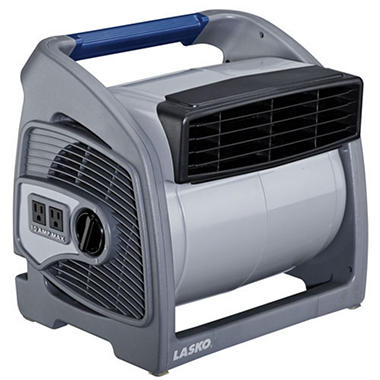
|
|
|
|
|
03-18-2014, 11:10 AM
|
#406 | |
|
Senior Member
Join Date: Nov 2011
Drives: Some rust bucket
Location: Polar ice cap
Posts: 3,058
Thanks: 312
Thanked 1,046 Times in 556 Posts
Mentioned: 37 Post(s)
|
Quote:
The card gets sick within five or so minutes. Is there an easy way to see which GPU is reporting to be sick without touching the heatsink and burning myself? lol I'll double check all the connections and play around with the SATA connectors on the riser cables to see if I can get it stable. I feel like issues only come up with you run five cards. Seems to be fine with just four cards. With Afterburner, can I adjust the core/mem speeds on the fly while cgminer is running? Basically I won't need to set the core/mem speeds within cgminer? |
|
|
|
|
|
|




