


|
||||||
| Electronics | Audio | NAV | Infotainment Anything related to in-car electronics, navigation, and infotainment. |
 |
|
|
Thread Tools | Search this Thread |
 10-13-2013, 05:06 PM
|
#1 |
|
Apostle

Join Date: Apr 2013
Drives: Fast Microwave
Location: Southern California
Posts: 283
Thanks: 276
Thanked 83 Times in 48 Posts
Mentioned: 1 Post(s)
|
DIY: Used 2012 Toyota Display Audio with Entune
BACKGROUND
WHO: - Me, aka cheapass - 2013 Scion FR-S with the regular Scion stereo WHAT: - Used 2012 Corolla Nav / Entune off of eBay - I had to buy a new entune wiring harness, OEM "C" scion stereo brackets, and a gps antenna. WHY: -Save some $$$!!! I got it WAY cheaper than buying a new Scion Display Audio unit, and extension box. - No custom wiring harnesses because everything plugs in! - Keep your factory microphone, usb connector, and auxiliary input. - It’s also ready to add an OEM backup camera and XM radio. Differences of Toyota Display Audio vs Scion Display Audio ? Positives - The startup screen is the Toyota logo for all you JDM types. - I believe you can upload a different image via USB if you want to change it so that’s pretty moot. Here's a link: http://toyota-entune.com/forum/viewt...70dd1c23#p1818 Negatives - No vehicle specific audio tuning (xA, xB, xC, xD, FR-S, etc) - No SSP (feel, hear, etc.) - No voice command button (picture); You get an eject button, and a pause/play button. PARTS 2012 Toyota Corolla 6.1” Display Audio Stereo Toyota Part: ? 86140-02110, CVH-3618ZT ? Made by Pioneer, P10313 Software Version: 01700PU 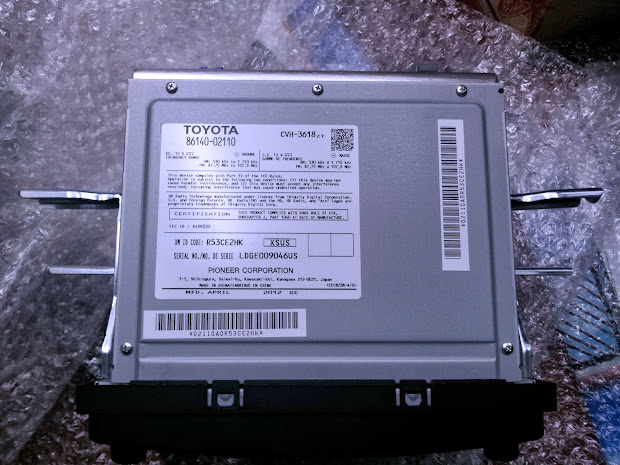  2012 Entune Navigation Module Toyota Part: PT296-47120 EA Made by Harmann Automotive Software Version: Main 1.8.4, Sub 1.6.18  Scion OEM “C” Display Audio Brackets THIS REQUIRES REUSE OF THE ORIGINAL BRACKETS from your Scion OEM Stereo Holds the Display Audio and Extension Box together Toyota Part: PT591-00140 Entune Pass Through Harness Connects the Entune Navigation Module to the Display Audio Toyota Part: PT296-47120-AB  GPS Antenna Toyota Part: ? I bought aftermarket. http://www.ebay.com/itm/320819856679...84.m1439.l2649 REQUIRES MODIFYING THE PLUG, DO THIS BEFORE YOU PUT IT IN THE CAR! Trim the two tabs circled until it fits into the Entune module.  INSTALLATION Tools
- remove side and stereo facia - pops out by hand - remove oem stereo - 10 mm socket with extension - remove mounting brackets and reinstall onto display audio - 8mm socket. - Scion OEM “C” brackets for Display Audio - Scion OEM brackets from your original Stereo - remove gauge cluster: OPTIONAL IF YOU WANT TO MOUNT GPS ANTENNA BEHIND THE CLUSTER - remove screw from hood - pop out shroud, use plastic pry tools - remove hood, pulls strait out - remove two screws from the gauge cluster, pull strait out and unplug [ame="http://www.youtube.com/watch?v=3NU5ba3ChgM"]Remove the Gauge Cluster of FR-S, BRZ - YouTube[/ame] - mount gps antenna - my antenna was magnetized so i put it on a bracket behind the gauge cluster - zip tie loose cables  -install the display audio - make sure you plug your radio and gps cables into the ENTUNE module  - reinstall everything -reset your entune module via service menu - http://priuschat.com/threads/entune-...n-risk.126230/ - settings -> nav voice volume -> up down x3 - reset module and gps location -drive the car - The nav map wont update your location until you physically move in the car - pair your bluetooth with your phone - enjoy! NOTES TOYOTA DISPLAY AUDIO: Positives: - Bluetooth seems to work better for sending song information versus the original scion stereo. Pandora sends more information on my Samsung Galaxy S2. - Phone capabilities are better; it’s much easier to use your phone book and history. Voice command on my Galaxy S2 sucks so I prefer to use Display Audio’s interface. - The night lighting color matches the orange in the rest of the interior.  Negatives: - The sound is pretty flat. The factory equalizer adjustment is a joke (low, mid high). I boosted some low end, and have used my phone’s built in equalizer to compensate. Not sure how much my brain is making up but I remember the original stereo sounding more full. I’d like to compare it to someone else’s OEM Scion setup. - I would really like to reflash this thing to Scion’s programming. I’m sure there is some way to do it. If you have any info, please hit me up. ENTUNE EXTENSION: - Enables Navigation - Enables texting capabilities for your phone. I haven’t tried it, seems pretty gimmicky. - Entune Apps: Seems super gimmicky, only useful ones appear to be weather, traffic, Pandora and iHeartRadio - Requires the creation of an online account to use the apps, which asks for a vehicle VIN. =( - It has been recently made free. http://www.engadget.com/2013/09/12/t...s-entune-fees/ - Operates in conjunction with an Entune app for your phone. I hear the app sucks, go figure. - Entune is an upgradeable system; requires the Entune app or dealer service. Priuschat has uploaded version 2.1.0. I hear it breaks bluetooth connectivity for some phones so I wouldn’t be in a rush to upgrade. I’ve also read that it forces the use of the Entune app, which is not compatible with all phones. I would avoid it for now. -I’m wondering if this can also be reflashed to become Bespoke with Aha. I’m not sure how much difference there is but both extension boxes are made by Harman and look similar, so I’m guessing the hardware is the exact same. If you have any info, please hit me up. ENTUNE Update - V 5.2.0 Official Entune Update directly from Toyota! https://securedp.toyota.com/download-app/toyota Last edited by P@ul; 09-18-2016 at 02:09 PM. |

|

|
|
10-31-2013, 03:10 AM
|
#2 |
|
Senior Member
Join Date: Jul 2012
Drives: B9 S4/ND2
Location: Fullerton, CA
Posts: 522
Thanks: 190
Thanked 182 Times in 106 Posts
Mentioned: 21 Post(s)
|
TL;DR
|
|
|
|
|
10-31-2013, 11:36 AM
|
#3 |
|
Senior Member
Join Date: Aug 2013
Drives: Raven FR-S MT
Location: Starkville, MS
Posts: 341
Thanks: 81
Thanked 148 Times in 101 Posts
Mentioned: 11 Post(s)
|

__________________
2013 Scion FR-S - Build Thread
2015 Ford Mustang GT 1978 Triumph Spitfire 1500 ----------------------------------------------  |
|
|
|
|
03-07-2014, 12:17 AM
|
#4 |
|
Apostle
Join Date: Apr 2013
Drives: Fast Microwave
Location: Southern California
Posts: 283
Thanks: 276
Thanked 83 Times in 48 Posts
Mentioned: 1 Post(s)
|
ENTUNE Update - 3.2.0
ENTUNE Update - V 3.2.0
Hurray! Thanks to our sister forum Toyota Nation (TY Glramos!), We now have an update to Entune 3.2.0! Check it out here: http://www.toyotanation.com/forum/32...load-link.html I just updated from an ancient 1.8.4 to 3.2! And I'm happy to report that it fixed my Pandora issue (wouldn't play high quality audio).  Just like the instructions say, download the files and copy the iso + txt to a flash drive titled 14A. Start your engine and plug it in, follow the directions on screen and wait! 
Last edited by P@ul; 03-07-2014 at 12:46 AM. |
|
|
|
|
03-07-2014, 01:18 AM
|
#5 |
|
Member
Join Date: Feb 2014
Drives: 2014 FRS, 77 Celica, 88 Supra Turbo
Location: Spokane Wa, Sandpoint Id
Posts: 51
Thanks: 141
Thanked 22 Times in 10 Posts
Mentioned: 1 Post(s)
|
Awesome mods.. I'll be looking into this sometime for the GPS!
Thank you
__________________
|
|
|
|
|
03-07-2014, 09:06 AM
|
#6 | |
|
Senior Member
Join Date: Nov 2013
Drives: 2014 Scion FR-S|Whiteout
Location: Irvine, CA
Posts: 1,006
Thanks: 502
Thanked 478 Times in 313 Posts
Mentioned: 16 Post(s)
|
Quote:
I'm assuming you have to have EnTune already and not AHA?
__________________
My 2014 FRS build thread: http://www.ft86club.com/forums/showthread.php?t=52071
“You might be poor, your shoes might be broken, but your mind is a palace.” - Frank McCourt |
|
|
|
|
|
03-07-2014, 01:29 PM
|
#7 | |
|
Apostle
Join Date: Apr 2013
Drives: Fast Microwave
Location: Southern California
Posts: 283
Thanks: 276
Thanked 83 Times in 48 Posts
Mentioned: 1 Post(s)
|
Quote:
I now have iHeartRadio, MovieTickets.com , and OpenTable. From what I can tell, Aha has more functionality than Bespoke. *shrughs* I've never used it. Sent from my Nexus 5 using Tapatalk |
|
|
|
|
|
03-07-2014, 02:24 PM
|
#8 |
|
86 Owners of New England

Join Date: Dec 2012
Drives: Toyota GT86
Location: Boston, MA
Posts: 954
Thanks: 355
Thanked 1,195 Times in 542 Posts
Mentioned: 29 Post(s)
|
What about sub out for subwoofers?
__________________
 |
|
|
|
|
03-10-2014, 02:07 AM
|
#9 | |
|
Apostle
Join Date: Apr 2013
Drives: Fast Microwave
Location: Southern California
Posts: 283
Thanks: 276
Thanked 83 Times in 48 Posts
Mentioned: 1 Post(s)
|
Quote:
http://www.scion.com/manuals/nav_audio/ |
|
|
|
|
|
03-10-2014, 02:08 AM
|
#10 | |
|
Apostle
Join Date: Apr 2013
Drives: Fast Microwave
Location: Southern California
Posts: 283
Thanks: 276
Thanked 83 Times in 48 Posts
Mentioned: 1 Post(s)
|
Quote:
|
|
|
|
|
|
03-10-2014, 02:23 AM
|
#11 |
|
A Demon

Join Date: Dec 2013
Drives: Raven GT86
Location: Denver
Posts: 1,992
Thanks: 190
Thanked 1,321 Times in 701 Posts
Mentioned: 20 Post(s)
|
Has anyone changed the start up screen for the 14 unit using this method?
|
|
|
|
|
03-13-2014, 12:22 PM
|
#12 |
|
Senior Member
Join Date: Dec 2011
Drives: ‘16 4Runner, ‘19 Corolla HB
Location: Hurricane, WV
Posts: 1,233
Thanks: 685
Thanked 813 Times in 435 Posts
Mentioned: 4 Post(s)
|
Is this effectively the same as the '14 Bespoke unit? Based on the user manuals, it appears to be the case.
Shame that the FR-Ss are essentially still using the original Toyota Entune units. I have the latest Entune unit on my '14 Rav4 and it is quite the upgrade (higher res screen, little more user friendly, more user friendly nav, better and more capable voice commands). I much prefer it to the 7" HDD Entune unit that is in my '12 Prius v Five (advanced tech package). |
|
|
|
|
03-13-2014, 02:44 PM
|
#13 | |
|
Apostle
Join Date: Apr 2013
Drives: Fast Microwave
Location: Southern California
Posts: 283
Thanks: 276
Thanked 83 Times in 48 Posts
Mentioned: 1 Post(s)
|
Quote:
Is your Rav4 unit one of the systems with a custom dash integration? Or is it a standard DIN style one? All the scions use the double DIN style head unit, so until the Toyota corporate double din gets upgraded then no dice. I'll keep a look out though, this screen is ancient tech. Sent from my Nexus 5 using Tapatalk |
|
|
|
|
|
03-13-2014, 03:46 PM
|
#14 | |
|
Senior Member
Join Date: Dec 2011
Drives: ‘16 4Runner, ‘19 Corolla HB
Location: Hurricane, WV
Posts: 1,233
Thanks: 685
Thanked 813 Times in 435 Posts
Mentioned: 4 Post(s)
|
DIY: Used 2012 Toyota Display Audio with Entune
Quote:
My v has the 7" unit. HDD based instead of flash like yours and all the new ones. It was sort of a relic that had Entune adapted to it. Rav is integrated, but I'm more talking about the software rather than the physical unit itself. Looking through the Scion manuals, the screens look almost identical to the '12 Camry Display Audio and Display Audio with Entune units. Basically, if you've messed with a '14 FR-S bespoke, how similar is it to the '12 corolla Entune you have? I guess we'll see if the soon to be released '15 models get a new radio. |
|
|
|
|
|
|
|
|
|
|
 Similar Threads
|
||||
| Thread | Thread Starter | Forum | Replies | Last Post |
| FS: 2013/2014 Toyota Display Audio | defylogik | Audio/Visual, Electronics, Infotainment, NAV | 28 | 09-11-2013 04:32 PM |
| FS: Scion Display Audio HU ($350 shipped) | SpeedLab | Audio/Visual, Electronics, Infotainment, NAV | 0 | 09-06-2013 12:13 PM |
| Scion Display Audio: New Base Unit | DieselxIndustry | Electronics | Audio | NAV | Infotainment | 21 | 08-14-2013 03:21 PM |
| 2014 Display Audio | SleePi | Electronics | Audio | NAV | Infotainment | 1 | 08-13-2013 10:21 AM |
| WA Next meet Sun 30th June - Sprintex Test Drive AND A One Audio display plus special | invisage | Australian Meets & Events | 2 | 07-22-2013 03:20 AM |


