


|
||||||
| Electronics | Audio | NAV | Infotainment Anything related to in-car electronics, navigation, and infotainment. |
 |
|
|
Thread Tools | Search this Thread |
 06-09-2014, 03:13 AM
|
#15 | |
|
Senior Member
Join Date: Apr 2013
Drives: GTS 86 auto
Location: Australia
Posts: 486
Thanks: 263
Thanked 127 Times in 99 Posts
Mentioned: 3 Post(s)
Tagged: 0 Thread(s)
|
Quote:
__________________
GTS86 Auto (Australia)
|
|

|

|
|
06-09-2014, 09:34 AM
|
#16 | |
|
There are now 2 carseats!
Join Date: Nov 2012
Drives: 2013 DGM BRZ
Location: The Emerald City
Posts: 434
Thanks: 21
Thanked 166 Times in 75 Posts
Mentioned: 7 Post(s)
Tagged: 0 Thread(s)
|
Quote:
|
|
|
|
|
|
06-09-2014, 10:06 AM
|
#17 |
|
Senior Member

Join Date: Apr 2013
Drives: DGM BRZ 6MT
Location: San Francisco, CA
Posts: 758
Thanks: 223
Thanked 359 Times in 195 Posts
Mentioned: 15 Post(s)
Tagged: 0 Thread(s)
|
What additional benefits does an always-on backup camera give in addition to the already-installed side and rearview mirrors?
__________________
|
|
|
|
|
06-09-2014, 10:38 AM
|
#18 | |
|
Junior Member
Join Date: May 2014
Drives: GTS Cobolt Blue
Location: Adelaide Australia
Posts: 7
Thanks: 0
Thanked 2 Times in 2 Posts
Mentioned: 0 Post(s)
Tagged: 0 Thread(s)
|
Quote:
I been reading this thread for a couple days and wondering why would you need the rear view cam on always? Whats wrong with the mirrors? Im worried that the camera would over heat (especially if its 12v cam) and cause issues which would out weigh having it on always seeing whats going on behind ya. Theres also the danger of your eyes constantly looking at the HU instead of the road. A front cam I can understand getting that put on but once again only as needed, say for parking all other times I dont see the point of it being on. Sorry for throwing my 2 cents in but I think your chewing ur time up on a pointless exercise. |
|
|
|
|
|
06-09-2014, 10:27 PM
|
#19 | |
|
Senior Member
Join Date: Apr 2013
Drives: GTS 86 auto
Location: Australia
Posts: 486
Thanks: 263
Thanked 127 Times in 99 Posts
Mentioned: 3 Post(s)
Tagged: 0 Thread(s)
|
Quote:
Here's our FujitsuTEN h/u 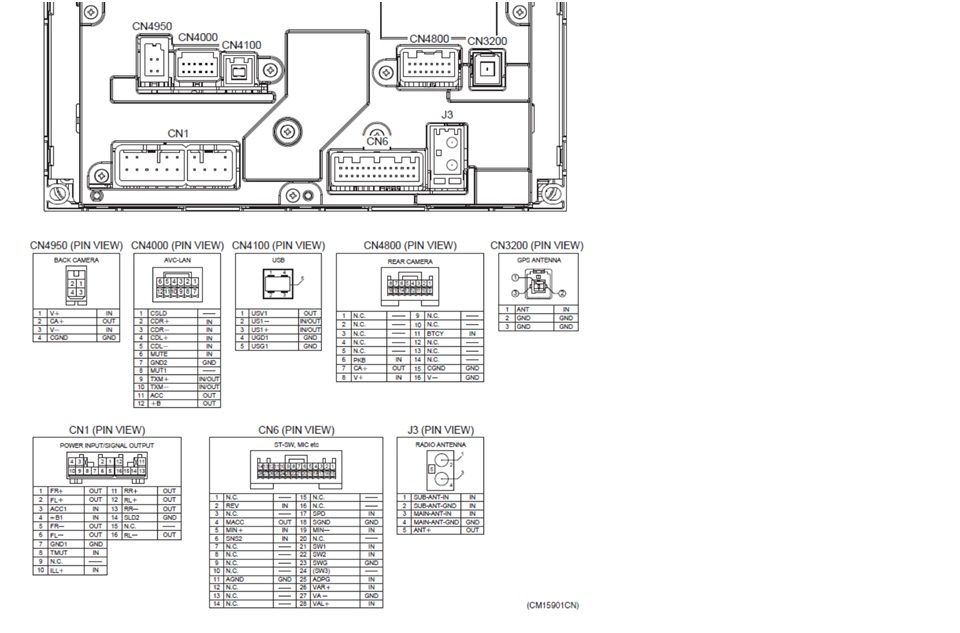 As it is not easy to read the pins, after much reading and peering I believe the following is true but I'm sure you will know if I am wrong: Fujitsu Ten Head Unit 4-pin section CN4950 This is where I have my rear camera working fine 10-pin section of CN1 power/speaker harness 1 2 - - 3 4 5 6 7 8 9 10 (orientation: viewing pins on car's factory plug, wires pointed away from you) Code: 1 RF+ 2 LF+ 3 +12V Accessory 4 +12V Battery/Constant 5 RF- 6 LF- 7 Ground 8 Power Antenna (provides power to Subaru's antenna booster amp) 9 [NC] {amp remote turn-on signal on Toyota HUs, not Subaru} 10 Illumination+ 6-pin section of CN1 power/speaker harness 1 - - 2 3 4 5 6 (orientation: viewing pins on car's factory plug, wires pointed away from you) Code: 1 RR+ 2 LR+ 3 RR- 4 [NC] 5 Dimmer (Illumination-) 6 LR- 28-pin CN6 SWC/aux/mic harness 1 .. 14 15 .. 28 (orientation: viewing pins on car's factory plug, wires pointed away from you) Pins with wires from the plug are marked green Code: 1 [NC] 2 Reverse Gear PIN 2 = Reverse gear IN. Although it comes in here it seems to tell CN4950 and CN4800 if reverse is selected 3 Illumination Dimmer Cancel (Bright mode) 4 Mic ? (separate, possibly ground) 5 Mic ? (twisted w/ 19) 6 Ground (not connected to mic) 7-10 [NC] 11 GND 12-14 [NC] 13 might be a VIDEO in and 14 the shield I have no wires to these 15 [NC] 16 [NC] 17 SGND VSS (vehicle speed signal) 18 SGND [NC] 19 Mic ? (twisted w/ 5) 20 [NC] 21 SWC Audio (Seek, Volume) 22 SWC Mode + Phone 23 SWC Common 24 [NC] 25 ADPG Aux enable 26 VAR+ IN Aux audio Right 27 VA- GND Aux audio shield/ground 28 VAL+ IN Aux audio Left 16-pin rear camera socket 1 ... 8 9 ... 16 (orientation: viewing pins on car's factory plug, wires pointed away from you) Code: 4 ? function unknown 5 ? function unknown 6 Parking brake grey wire The parking brake signal is used to block display of movie video (from USB movie files or DVD) or the aux video input. It may also be used to temporarily disable certain menus that the car or HU manufacturer deemed to be too distracting for the driver to use while the car is moving. It can be left connected or disconnected. 7 Camera +6V supply (HU sends power to OEM Camera) 8 Camera Video In 11 BTCY In ????? = 15 Camera Detect (I have read the h/u connects this pin to ground internally. I cannot understand how the camera is detected as simply having a camera connected is enough) I have no wire to it. 16 Shield/ground
__________________
GTS86 Auto (Australia)
Last edited by notout86; 06-09-2014 at 10:41 PM. Reason: corrected the link |
|
|
|
|
| The Following User Says Thank You to notout86 For This Useful Post: | JHSurf (10-01-2014) |
|
06-09-2014, 10:30 PM
|
#20 |
|
Senior Member
Join Date: Apr 2013
Drives: GTS 86 auto
Location: Australia
Posts: 486
Thanks: 263
Thanked 127 Times in 99 Posts
Mentioned: 3 Post(s)
Tagged: 0 Thread(s)
|
)
__________________
GTS86 Auto (Australia)
Last edited by notout86; 06-09-2014 at 10:43 PM. |
|
|
|
|
06-12-2014, 04:27 AM
|
#21 |
|
Victim's aren't we all

Join Date: Aug 2013
Drives: Toyota GTS 86 - Pegasus White
Location: Melbourne, Australia
Posts: 90
Thanks: 18
Thanked 9 Times in 6 Posts
Mentioned: 0 Post(s)
Tagged: 0 Thread(s)
|
I know with my after market Sony 601BT, I just press SOURCE and it turns the back camera on and I can drive all I like with that enabled. I don't have the auto-reverse wiring. So it's only way it's turned on/off on my unit.
|
|
|
|
|
06-26-2014, 01:35 AM
|
#22 | |
|
Senior Member
Join Date: Apr 2013
Drives: GTS 86 auto
Location: Australia
Posts: 486
Thanks: 263
Thanked 127 Times in 99 Posts
Mentioned: 3 Post(s)
Tagged: 0 Thread(s)
|
Quote:
HOWEVER, ChiefG's idea of " split the video signal with a RCA-Y connector " has given me an idea that may be simpler for adding a front cam to an existing rear cam system. Have a RCA-Y video output connected to the 16-pin Rear Camera socket CN4800 at pin8 for video and pin16 for the video shield. Connect the front and rear camera video signals to the RCA-Y. Have the rear camera powered by pin 7 in the designed way which means it will be powered when reverse gear is selected as signalled by the voltage that goes to pin 2 of the 28pin socket CN6. On startup, during the h/u boot-up it will detect a camera as it is designed to do and the rear-camera mode will be enabled. When reverse is selected the rear camera pic will appear. Have the front camera also connected to pin 7 for power BUT switchable. Also have the front cam such that when switched it will (1) enable power from pin7 and also (2) send power to pin 2 of CN6 so the h/u thinks it is in reverse AND (3) at the same time cut power to the reverse cam. Then the only powered cam to pin 7 of CN4800 will be the front one so that should be the pic you see. Does this sound OK? If it is can anyone tell me how to rig up the switching and relays please. If possible I’d like only one switch.
__________________
GTS86 Auto (Australia)
|
|
|
|
|
|
06-30-2014, 11:24 PM
|
#23 |
|
Member
Join Date: Apr 2014
Drives: 2013 Subaru BRZ Limited
Location: Pittsburgh, PA
Posts: 73
Thanks: 0
Thanked 10 Times in 10 Posts
Mentioned: 0 Post(s)
Tagged: 0 Thread(s)
|
I used a splice harness to connect video to pins 13(video+) and 14(video-) on the 28-pin harness. I don't think our H/U has an interface to those video pins.
I'm also not sure how to navigate to it on the interface. I had to plug in an audio auxiliary cable to get the 'aux' indication to show up. That didn't show any video. Basically, I think the only way to get video on the screen is to use the reverse wire. As far as I know, there is no way to get rid of the navigation lines that show up with the reverse camera on the stock H/U.
__________________
Garage:
2013 BRZ Limited 6MT - Galaxy Blue 1994 Ford Probe GT 5MT - Red(some would argue pink) 1969 Mustang Fastback 4MT - Royal Maroon |
|
|
|
| The Following User Says Thank You to greencounty For This Useful Post: | notout86 (07-01-2014) |
|
07-01-2014, 12:00 AM
|
#24 |
|
Member
Join Date: Apr 2014
Drives: 2013 Subaru BRZ Limited
Location: Pittsburgh, PA
Posts: 73
Thanks: 0
Thanked 10 Times in 10 Posts
Mentioned: 0 Post(s)
Tagged: 0 Thread(s)
|
Do you already have a backup camera installed?
I don't think you need relays, I would use a harness that is intended for backup camera operation to interface with the H/U and then put a Double Pole Double Throw(DPDT) switch on the outputs of that harness(i.e. switch power for the cameras on one pole and the camera outputs on the other) You can tie the Video(-) leads together(tie together the 2 cameras and the H/U harness) Here's a sketch(professionally drawn in MSPaint): 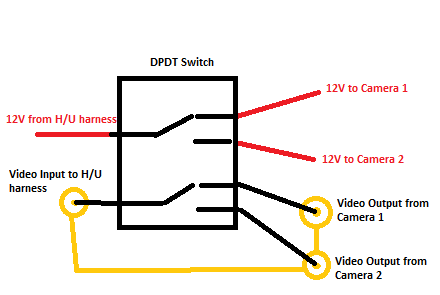 Here is the harness that I used for the connection of my backup camera: http://www.autoharnesshouse.com/19867.html It has a +12V output that could be passed through a switch as described. Note that this will activate the selected camera when the reverse wire in the 28-pin harness sees +12V. How do you plan to trigger the Reverse signal?
__________________
Garage:
2013 BRZ Limited 6MT - Galaxy Blue 1994 Ford Probe GT 5MT - Red(some would argue pink) 1969 Mustang Fastback 4MT - Royal Maroon |
|
|
|
| The Following User Says Thank You to greencounty For This Useful Post: | notout86 (07-01-2014) |
|
07-01-2014, 03:06 AM
|
#25 | |
|
Senior Member
Join Date: Apr 2013
Drives: GTS 86 auto
Location: Australia
Posts: 486
Thanks: 263
Thanked 127 Times in 99 Posts
Mentioned: 3 Post(s)
Tagged: 0 Thread(s)
|
Quote:
From my understanding, like you, I would have expected your splice harness to 13 & 14 to work as long as you activated the Aux icon to appear on your display as you did with an audio cable in the Auxiliary port. If it didn't work it could be (and please take my thoughts in good faith and realise I'm no expert): a) your socket for pins 13 and 14 does not have those actual pins .. I have read that they may not be present, either that or the leads in the plug are absent.. what I read was not clear on that. b) having got the Aux icon as active, did you then touch it ... the time I got my icon showing I was so excited that I didn't think to do that for a while DOH c) was the camera powered? unlikely I know d) is your harness correctly wired with the video to pin 13 (unlikely too) e) I also read "To display the aux video, the HU must also see the parking brake engaged (pin 6 on the 16pin socket) and the car not moving faster than a certain speed. So you'll need to ground the HU's parking brake input (grey or RED on some toyotas!!" Have a look here for more http://forums.nasioc.com/forums/show...28&postcount=9 and for complete information overload, which is how I am http://www.ft86club.com/forums/showthread.php?t=35778 The above is specific to your first post. I have sent another in reply to your second.
__________________
GTS86 Auto (Australia)
|
|
|
|
|
|
07-01-2014, 04:16 AM
|
#26 | |
|
Senior Member
Join Date: Apr 2013
Drives: GTS 86 auto
Location: Australia
Posts: 486
Thanks: 263
Thanked 127 Times in 99 Posts
Mentioned: 3 Post(s)
Tagged: 0 Thread(s)
|
Quote:
Yes I do have a rear cam installed in the standard way to pin 8 of the 16pin socket CN4800. Luckily the cam works fine with 6v so I am powering it from pin 7. Thanks for your sketch. That is what I am after and I believe I follow it. In my case I am lucky that my cameras run with 6V so I can power from pin 7. You ask how I plan to trigger the Reverse signal and that's something I do not know. If I am to have only one switch which is highly desireable, then I guess I need a TRIPLE Pole Triple Throw(TPTT) switch ( if there is such a thing) or something, and I'm guessing that's where my notion of a relay comes in but that is where I am way out of my depth and doubts creep into my brain cell about whether all the switching can occur simultaneously or should they be in a certain order. A little bit of knowledge can get you into trouble if you don't have the full story. Ignorance means fear for me. To add a front cam I am presently avoiding the use of pins on the 28pin socket CN6 as I have not had any luck getting info. The poster guru SVXdc who produces harnesses and has made many posts about cameras and also has a terrific reputation for being helpful (I found him to be so myself) has not replied to my email with more questions and an order for a harness in several weeks. He has not replied to a second email either so I am pushing on myself unless/while he replies. Hence I posted my idea inspired by ChiefG using a RCA-Y connector but to 16pin socketCN4800. Another poster called robot was helping but may have given up on me due to information overload or for any number of reasons. If the Y video to pin 8 method works there is no need to have a jack in the Aux port I will get to the bottom of this dual camera project and post the solution. I am surprised that I haven't found a step by step tutorial that I can follow, especially as I believe these cars can do with two cameras. As a matter of fact I am using my front cam to avoid scraping the nose, but I have to select reverse, peek at the pic, go out of reverse, drive forward a bit etc. Not good! I don't know if I am coming or going literally.
__________________
GTS86 Auto (Australia)
|
|
|
|
|
|
07-01-2014, 07:08 AM
|
#27 |
|
Member
Join Date: Apr 2014
Drives: 2013 Subaru BRZ Limited
Location: Pittsburgh, PA
Posts: 73
Thanks: 0
Thanked 10 Times in 10 Posts
Mentioned: 0 Post(s)
Tagged: 0 Thread(s)
|
First off, My parking brake pin is shorted to ground. The backup camera harness does that. The H/U recognizes this if I go into the settings menu.
I was powering the video from another video source so that I'd be sure to have a solid video output connection. I'm not sure how I know if my H/U has this capability. My car has the standard 2013 BRZ Fujitsu Ten unit, so it may not be active. I did get the reverse camera to work. I just can't get rid of the navigation lines. Thanks for the links. I'll check them out later. I'm a bit confused as to what harness you are looking for. Do you need the 28-pin connector/harness?
__________________
Garage:
2013 BRZ Limited 6MT - Galaxy Blue 1994 Ford Probe GT 5MT - Red(some would argue pink) 1969 Mustang Fastback 4MT - Royal Maroon |
|
|
|
|
07-01-2014, 07:18 AM
|
#28 |
|
Member
Join Date: Apr 2014
Drives: 2013 Subaru BRZ Limited
Location: Pittsburgh, PA
Posts: 73
Thanks: 0
Thanked 10 Times in 10 Posts
Mentioned: 0 Post(s)
Tagged: 0 Thread(s)
|
Also, If I understand correctly, this is what you would like the switch to do:
Pole 1-Camera 1 active. Reverse wire has +12V signal. Off-Reverse wire only active in reverse. Camera 1 active. Pole 2-Camera 2 active. Reverse wire has +12V signal. Is this correct?
__________________
Garage:
2013 BRZ Limited 6MT - Galaxy Blue 1994 Ford Probe GT 5MT - Red(some would argue pink) 1969 Mustang Fastback 4MT - Royal Maroon |
|
|
|
|
|
|
|
|
|
 Similar Threads
|
||||
| Thread | Thread Starter | Forum | Replies | Last Post |
| DIY Rear Backup Camera on Bumper (small) | Hachiroku14 | DIY (Do-It-Yourself) Guides | 37 | 01-29-2015 05:52 PM |
| Fs: Beat-Sonic BCAM7 Rear Backup Camera (New) | ucsmfu | Canada Classifieds | 2 | 01-29-2014 07:00 PM |
| Fs: Beat-Sonic BCAM7 Rear Backup Camera | ucsmfu | Audio/Visual, Electronics, Infotainment, NAV | 0 | 01-09-2014 10:45 AM |
| Fs: Beat-Sonic BCAM7 Rear Backup Camera | ucsmfu | Canada Classifieds | 0 | 01-05-2014 06:20 AM |
| photoblockers for traffic camera | tnt | Scion FR-S / Toyota 86 GT86 General Forum | 22 | 08-22-2012 11:05 PM |


 2013 Suburu BRZ
 Toyota GTS86