


 03-05-2016, 09:22 PM
|
#71 | |

Join Date: Jul 2012
Drives: S2000 CR
Location: Orange County
Posts: 14,564
Thanks: 8,942
Thanked 14,213 Times in 6,856 Posts
Mentioned: 970 Post(s)
Tagged: 14 Thread(s)
|
Quote:
|
|

|

|
| The Following User Says Thank You to CSG Mike For This Useful Post: | TCR (03-05-2016) |
|
03-06-2016, 12:45 AM
|
#72 |
|
Member
Join Date: Apr 2015
Drives: 2013 Toyota 86 GT
Location: Brisbane, Australia
Posts: 56
Thanks: 14
Thanked 8 Times in 7 Posts
Mentioned: 0 Post(s)
Tagged: 0 Thread(s)
|
Thanks Mike.
Only other issue I'm having at the moment is with the Test Database and Lap Manager tabs. When I was trying to setup my default view, I was resizing some of the windows I had opened and closed both the Test Database and Lap Manager windows. Ever since then, whenever I try to click on the tabs (highlighted on the image below), nothing happens and I cannot seem to open these screens at all. The only way I can get them to reopen is to restart the software. Any ideas? 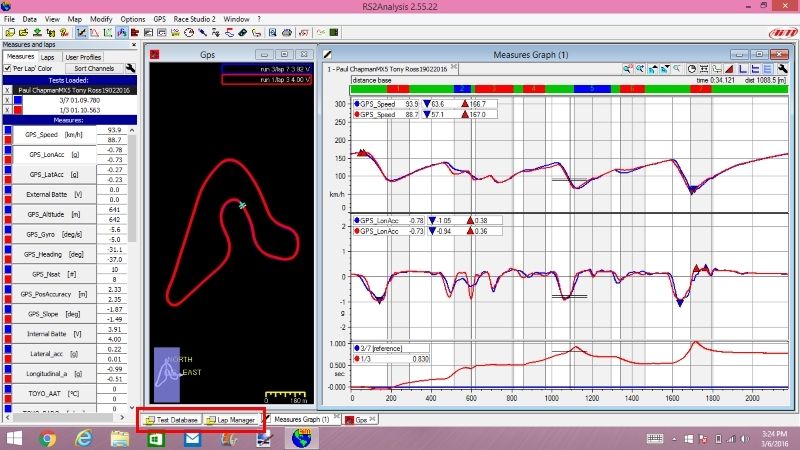
__________________
Build Thread: http://www.ft86club.com/forums/showthread.php?t=91536
|
|
|
|
|
03-06-2016, 02:01 AM
|
#73 | |
|
Join Date: Jul 2012
Drives: S2000 CR
Location: Orange County
Posts: 14,564
Thanks: 8,942
Thanked 14,213 Times in 6,856 Posts
Mentioned: 970 Post(s)
Tagged: 14 Thread(s)
|
Quote:
If you load a test, Lap Manager will come up as a tab. |
|
|
|
|
|
03-06-2016, 02:39 AM
|
#74 |
|
Member
Join Date: Apr 2015
Drives: 2013 Toyota 86 GT
Location: Brisbane, Australia
Posts: 56
Thanks: 14
Thanked 8 Times in 7 Posts
Mentioned: 0 Post(s)
Tagged: 0 Thread(s)
|
Yeah, tried that. I click on the Data tab and then Load Test from the drop down menu, the screen flickers (like it's opened) but the screen stays the same. The tab below is "selected" like it's open, and if I click on the Data tab a second time, the Load Test option is greyed out (unavailable). It's like it's opened somewhere but I cant see it. Even if I minimise everything I have open I can't see it.
I even tried deleting the software and reinstalling it.
__________________
Build Thread: http://www.ft86club.com/forums/showthread.php?t=91536
|
|
|
|
|
03-07-2016, 11:13 PM
|
#75 |
|
Member
Join Date: Apr 2015
Drives: 2013 Toyota 86 GT
Location: Brisbane, Australia
Posts: 56
Thanks: 14
Thanked 8 Times in 7 Posts
Mentioned: 0 Post(s)
Tagged: 0 Thread(s)
|
Couldn't work it out, so uninstalled the software, deleted all associated files and then reinstalled the software. Seems to work ok now.
__________________
Build Thread: http://www.ft86club.com/forums/showthread.php?t=91536
|
|
|
|
|
04-09-2016, 11:07 AM
|
#76 | |
|
Senior Member

Join Date: Apr 2013
Drives: 22 GR86, 13 FR-S, AP2 S2000
Location: Sac, NorCal
Posts: 407
Thanks: 208
Thanked 220 Times in 118 Posts
Mentioned: 14 Post(s)
Tagged: 0 Thread(s)
|
Quote:
You are suggesting setting all of the ECU channels at 100Hz instead of the default 10Hz? If so, have you encountered any space/capacity issues with the 16 mb internal memory at the max sample rate?
__________________
A. Miracle #013
TunerCloud 86 Go Fast Parts |
|
|
|
|
|
04-10-2016, 03:39 AM
|
#77 | |
|
Join Date: Jul 2012
Drives: S2000 CR
Location: Orange County
Posts: 14,564
Thanks: 8,942
Thanked 14,213 Times in 6,856 Posts
Mentioned: 970 Post(s)
Tagged: 14 Thread(s)
|
Quote:
|
|
|
|
|
|
04-10-2016, 12:38 PM
|
#78 | |
|
Senior Member
Join Date: Apr 2013
Drives: 22 GR86, 13 FR-S, AP2 S2000
Location: Sac, NorCal
Posts: 407
Thanks: 208
Thanked 220 Times in 118 Posts
Mentioned: 14 Post(s)
Tagged: 0 Thread(s)
|
Quote:
__________________
A. Miracle #013
TunerCloud 86 Go Fast Parts |
|
|
|
|
| The Following User Says Thank You to AyJay For This Useful Post: | CSG Mike (04-11-2016) |
|
04-13-2016, 12:37 AM
|
#79 |
|
Junior Member
Join Date: Apr 2014
Drives: Toyota 86
Location: Singapore
Posts: 7
Thanks: 0
Thanked 0 Times in 0 Posts
Mentioned: 0 Post(s)
Tagged: 0 Thread(s)
|
Starting point problem
Hi Mike,
Bought the Solo DL from you last Oct. I am having some issues with the GPS map. The start point for the different laps are not consistent. See attached screenshot. The blue cross is for the red lap and the yellow cross is for the blue lap. There is a shift of around 70m between the 2 laps. This makes it difficult for me to compare between laps, rendering the time different graph(very useful graph) useless. Are there any settings I can do to resolve this issue? The track is a F3 standard 2km track and logging was done on a clear bright day. I have the same issue on the Shanghai F1 track (5km) but with a shorter distance error of 50m. See attached. |
|
|
|
|
04-14-2016, 01:38 PM
|
#80 | |
|
Join Date: Jul 2012
Drives: S2000 CR
Location: Orange County
Posts: 14,564
Thanks: 8,942
Thanked 14,213 Times in 6,856 Posts
Mentioned: 970 Post(s)
Tagged: 14 Thread(s)
|
Quote:
Also, make sure you are mounting the unit in a location where it has a clear view of the sky. How many satellites are locked in your data? |
|
|
|
|
|
04-14-2016, 01:59 PM
|
#81 | |
|
Junior Member
Join Date: Apr 2014
Drives: Toyota 86
Location: Singapore
Posts: 7
Thanks: 0
Thanked 0 Times in 0 Posts
Mentioned: 0 Post(s)
Tagged: 0 Thread(s)
|
Quote:
What do you mean by making the scale adjustable? Is there a function to laterally shift one of the laps in order to make the laps in phase? The unit is mounted at the front dashboard and has clear view of the sky. Typically 4-6 satellites are locked on but I never really take notice of that when lapping. I always make sure that the unit is happy with the number of satellites locked on prior to starting the practice. Without sufficient satellites locked on, the unit will not start logging anyway. |
|
|
|
|
|
04-14-2016, 02:29 PM
|
#82 | |
|
Join Date: Jul 2012
Drives: S2000 CR
Location: Orange County
Posts: 14,564
Thanks: 8,942
Thanked 14,213 Times in 6,856 Posts
Mentioned: 970 Post(s)
Tagged: 14 Thread(s)
|
Quote:
Tap the button on the top right, to the right of the clock. That'll let you individually shift. The GPS pickup issue can only be corrected by using the same track map every time, and making sure you have a good GPS signal. 4-6 is actually very weak. |
|
|
|
|
|
04-15-2016, 10:29 AM
|
#83 | |
|
Junior Member
Join Date: Apr 2014
Drives: Toyota 86
Location: Singapore
Posts: 7
Thanks: 0
Thanked 0 Times in 0 Posts
Mentioned: 0 Post(s)
Tagged: 0 Thread(s)
|
Quote:
I am not sure where is this 'clock' that you are talking about. Is this on the "Measures Graph" tab or other tab? Do you mean Time/Dist as the 'clock' and snap ON/OFF button as the button to the right? Clicking on it does not change anything and I still cannot find a way to individually shift the distance axis to match up the position on the track. I am using RS2Analysis 2.55.32 btw. |
|
|
|
|
|
04-18-2016, 01:59 PM
|
#84 | |
|
Join Date: Jul 2012
Drives: S2000 CR
Location: Orange County
Posts: 14,564
Thanks: 8,942
Thanked 14,213 Times in 6,856 Posts
Mentioned: 970 Post(s)
Tagged: 14 Thread(s)
|
Quote:
|
|
|
|
|
|
|
|
|
| Thread Tools | Search this Thread |
|
|
 Similar Threads
|
||||
| Thread | Thread Starter | Forum | Replies | Last Post |
| 2014 SCCA Solo Nationals/Pro Solo Finale thread | edj | Tracking / Autocross / HPDE / Drifting | 206 | 09-19-2014 11:34 AM |
| SCCA Socal Solo 2 at El Toro, Socal, 3/22-23, noob questions | JB86'd | Tracking / Autocross / HPDE / Drifting | 52 | 03-29-2014 04:00 AM |
| Wax Sealant Pad Questions / Care Questions | l0aded | Cosmetic Maintenance (Wash, Wax, Detailing, Body Repairs) | 3 | 03-25-2014 11:19 AM |
| 2013 Preliminary SCCA SOLO and PRO SOLO National Schedule | Scooby South | Tracking / Autocross / HPDE / Drifting | 13 | 12-05-2012 08:08 AM |





